How I made my Zig gameplay code hot reloadable
This blog post as well as all code listed in it are 100% written by me, a human, without any help from LLMs or other AI tools.
Code “hot reloading” means updating the code of a application while it is running. It is very useful during development when you want to quickly iterate on a feature without having to restart the game between every change, and it also gives you some serious superpowers when it comes to debugging, as we’ll see later on. The concept goes by many names, “Hot reloading”, “Live updating”, “Live reloading” etc, but they usually mean the same thing: The ability to change the logic of your app without having to shut it down.
Some environments/languages support hot reloading out of the box. Google’s Flutter UI framework can update the UI of your app as you are writing the code. Many scripting languages such as Lua, which are designed to be embedded in a host program, support hot reloading. Native languages, on the other hand, have historically not been great at it though it can be done with a little elbow grease as we’ll see in this blog post. I am going to explain how I added hot reloading support for the gameplay code in Traction Point, the game I am building as an indie developer. It isn’t necessarily the best way to do it, but it works well and I managed to do it in 1.5 weeks with only minimal rewrites of existing code.
A hybrid C++/Zig codebase
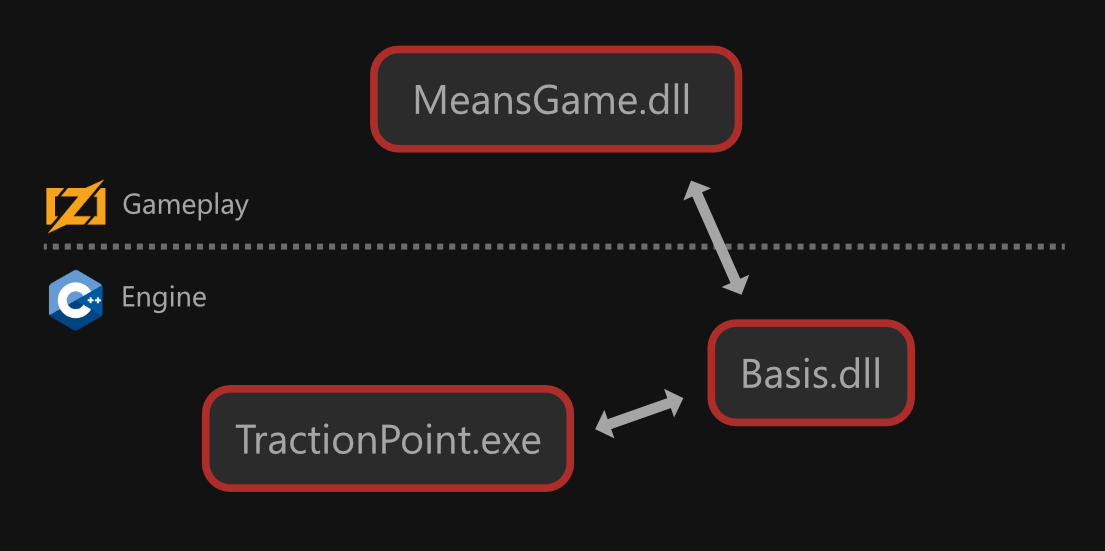
As we saw in the previous blog post, Traction Point has a hybrid codebase where the game engine is written in C++ and the gameplay code (ie. the game itself) is written in Zig. Why, you ask? The TLDR is that I had a mature C++ game engine I had spent years building, but I fell in love with the simplicity of Zig and wanted to use it to make a game. So I added an interop layer and exposed most of the engine APIs to Zig.
Image 1 shows the language split on a high level. The engine starts up and loads a Zig DLL containing the game code. After the initial startup, the engine takes a backseat and lets the game code drive the application. “Basis” is the name of my custom game engine, while “Means” is the project name of the game before it got its official name of Traction Point, and you’ll find it all over the codebase. The previous blog post goes into more detail about the architecture.
Hot reloading in practice
Before we dive deeper into my particular case, let’s think about what hot reloading is and what we need to implement it using a natively complied language. On a fundamental level, hot reloading means ripping out part of the logic of your app and replacing it with a different version. Ideally, the state (ie. the in-memory data) of your app survives this process as-is and the app continues running seamlessly using the new logic. For this, we need to support at least the following:
Loading and unloading a part of the app logic. This depends on the target platform, but generally it means organizing your app into an executable + one or more shared libraries / DLLs. The DLLs are hot reloadable, while the executable typically isn’t since we cannot “unload” it without shutting it down. When a new version of a DLL is available, the executable unloads the old and loads the new.
Keeping the state of the app intact across the hot reload. There are (at least) two ways to handle this: serialization vs. keeping the state in memory. Serialization means writing the whole state of the program to a data block, and reading that data block back when the new code is loaded, almost like a save file in a game. Keeping the state in memory means just that, don’t throw away the memory when unloading the DLL. There are pros and cons to each one and we’ll talk more about them later.
Patching up pointers that changed as part of the reload. Depending on how you tackled the previous point, this can be simple or complicated. (De)serialization typically sets up pointers as a natural part of loading the data back in, while keeping the memory loaded might mean that you have to patch things up yourself later. On the other hand, if the memory stayed loaded during the process, there probably aren’t that many pointers needing fix up.
Let’s see how I solved each of these for Traction Point.
Loading and unloading the game library
The code architecture turned out to be an excellent fit for hot reloading. Because of the C++/Zig language split, I already had the project using a separate DLL file for the gameplay logic, which gave me a pretty sensibel goal of trying to make the gameplay code hot reloadable, while leaving the game engine code out.
It’s not quite as simple as calling LoadLibrary() when the new code has been compiled though, as the operating system prevents you from writing to the DLL file while the game is running. The solution is to not actually load the DLL file the compiler produces, but copy it to a safe location and load it from there. To have Traction Point use hot reloading you have to start it with the -HotReload:true command line parameter, which does the following:
- Rather than loading the game library directly, it copies the lib to a new file with a distinct name (eg. GameReload.dll instead of Game.dll ) and loads that.
- Sets up a file watcher which reacts when the original library file changes.
When the file watcher is triggered, it runs pre-reload tasks, unloads the library, copies the file over, reloads it and runs post-reload tasks. We’ll get to what those pre/post reload tasks are in a bit.
Some debuggers can get confused when we load a renamed library file, depending on how the debug symbols are loaded. It hasn’t really been an issue for me but YMMV and you might have to do some gymnastics with the symbols to get the debugger to use them after the renaming.
With that, we have the ability to reload the game library. We can do it whenever the original file changes, or when we press a button in a debug menu. I even added a mode in which the game automatically reloads the library every 5 seconds, which is useful for testing the robustness of the system.
A quick detour into thread synchronization
The game engine uses a client-server architecture where the client runs on the main thread, while the server by default runs on a background thread (or indeed on another machine, perhaps on the other side of the planet, during a multiplayer game). A job system is used for going wide on certain operations, but it’s not exposed to Zig at the moment, so we don’t need to care about it here.
The client-server split is an issue, however, since both the main/client and server thread run Zig code. If the client unloads the game DLL while the server is executing game code we’ll have a crash. To work around this, we’ll need to set up a sync point during the frame when we know it is safe to unload/reload the library. This is done in C++ in the game engine using a thread gate:
// Code executed by both the client and the server.

Threading::ThreadID tid = Threading::getCurrentThreadID();

if (tid == Threading::mainThreadID)
{
	if (mZigAppLibraryHotReloadPending)
	{
		uint32_t threadsToWaitFor = isServerThreadRunning() ? 1 : 0;

		mZigAppLibraryHotReloadThreadGate->lock(threadsToWaitFor);
		performHotReloadZigAppLibrary();
		mZigAppLibraryHotReloadThreadGate->unlock();
	}
}
else if (tid == Threading::serverThreadID)
{
	mZigAppLibraryHotReloadThreadGate->arriveAt();
}
The client checks if we have a pending hot reload, and if we do, locks the thread gate. If we aren’t actually running a server thread (ie. this is a client-only process or the server is running on the main thread too) this is a no-op. The number of threads to wait for specifies how many threads should call arriveAt() before lock() returns. The server will eventually call arriveAt() which in turn blocks until the hot reloading operation is complete and unlock() is called by the client. If we had a third thread running Zig code we would simply increment threadsToWaitFor accordingly.
Keeping the game state intact
The Crème de la crème of hot reloading solutions use serialization to store and restore the app state during the unload/reload process. This is arguably the “correct” way to do it, as it allows you to change the memory layout of your types when hot reloading your code. It is, however, quite a lot of work to set up and the 1.5 weeks I had reserved for the hot reloading wasn’t enough to do that.
Instead I went with the “basic” approach of simply keeping alive whatever memory the Zig library had allocated, and using it as-is with the new library. As already mentioned, this doesn’t allow you to change the memory layout of any types stored in that memory. Eg. consider the following struct:
pub const Thing = struct {
	someInteger: i32 = 0,
	someFloat: f32 = 0.0, // <- This was added during the hot reload operation.
};
You have a Thing in memory and it only has a single someInteger field. As part of a hot reload you add someFloat as a second field and try to keep using the same memory: BOOM! You are now writing into whatever comes after the Thing whenever you try to write someFloat .
This might seem like a pretty big downside, and it can be depending on how you use hot reloading, but I personally very seldom find myself needing to add/remove/change the memory layout of the game state while the game is running. I just don’t use hot reloading for those kinds of large changes. Instead, I use it to iterate on game feel, ie. tweaking logic and constant values, immediate-mode UI rendering as well as debugging. But we’ll get to use cases later.
How, then, do we make the memory allocated by the game library survive the unload/reload process? We make sure the game only allocates memory from a pool/allocator which isn’t destroyed when the game library is unloaded. This is the first example of Zig being particularily well suited for this, since idiomatic Zig is very explicit about its memory allocations. Nothing prevents you from setting up a “global” allocator like in C++, but the std library expects you to provide an allocator to every type and function that will allocate, and because of that I’ve mostly stuck to that convention when writing gameplay code for Traction Point.
That doesn’t mean I am explicitly passing an allocator everywhere. Eg. game object components always have access to a general purpose allocator via their self.context field which every component needs to have. (The context stores important information about the mapping between the Zig component and the C++ game state). Here’s how one might use the allocator in a component:
pub const SomeComponent = struct {
    const Self = @This();
    pub const RegistrationName = "means.SomeComponent";

    context: GameObjectComponent,

    pub fn init(context: GameObjectComponent) !Self {
        return Self{
            .context = context,
        };
    }

    pub fn onObjectCreated(self: *Self) !void {
        var list = basis.ArrayList(i32).init(self.context.allocator);
        defer list.deinit();

        // use list for something ...
    }
};
The point is that we never “just allocate” memory in the Traction Point Zig code. We always know which allocator we are using. If we can get away with a fixed buffer or temporary allocator we’ll use that, but if it needs to be long-lived we’ll put it on a heap managed by the game engine. That way we can be sure it is still there after the hot reload.
Managing global data

One of the bigger problems I had to solve for hot reloading was deciding what to do about “global data”, ie. data that lives directly in a Zig file. I know it’s not “true global” data since Zig files themselves are instantiable but for the context of Traction Point I often consider this data to be global.
Let’s take the drive gauge in the HUD as an example. It lives in a file called hud_drive_gauge.zig and it contains some file-level variables. The file is then imported into the larger collection of HUD elements and treated as a singular thing. That effectively makes the file-level variables global data which should survive the hot reloading process. But since they aren’t allocated using the game engine’s allocator, their values get reset when the new library is loaded.
Here’s a snippet from the file, from before the hot reloading was implemented:
var gInitialized: bool = false;
var gCanvas = goofy.UICanvasPtr.Null;
var gGaugeBackground = goofy.SVGImagePtr.Null;
var gGaugeMarks = goofy.SVGImagePtr.Null;
var gNormalRangeMaxRPM: f32 = 0.0;
var gRedRangeMaxRPM: f32 = 0.0;
// ...

pub fn init(hudView: goofy.UIViewPtr) void {
    const canvas = hudView.getWidget(goofy.UICanvasPtr, "DriveGaugeCanvas");
    basis.assert(@src(), canvas != null);

    gGaugeBackground = means.ui_utils.loadSVGImage("game/ui/hud/driving_gauge_base.binsvg");
    gGaugeMarks = means.ui_utils.loadSVGImage("game/ui/hud/driving_gauge_marks.binsvg");

    gCanvas = canvas.?;
    gCanvas.setRenderCallback(.initFn(render));

    // ...
}
My solution to this was quite simply to not have any file-level variables that need to survive the process, and instead throw all of that data on the heap. In order to avoid having to rewrite thousands of lines of gameplay code, I introduced a concept called GlobalData which is in use in a few places in the code, eg. the HUD, and which allows the code to look much like it used to, while keeping the memory on the heap. Here’s the same section after the hot reloading was implemented:
pub const GlobalData = struct {
    initialized: bool = false,
    canvas: goofy.UICanvasPtr = .Null,
    gaugeBackground: goofy.SVGImagePtr = .Null,
    gaugeMarks: goofy.SVGImagePtr = .Null,
    normalRangeMaxRPM: f32 = 0.0,
    redRangeMaxRPM: f32 = 0.0,
    // ...
};

inline fn getG() *GlobalData {
    return &means.g.ui_manager.ingame_ui_view_model.hud_drive_gauge;
}

pub fn init(
    hudView: goofy.UIViewPtr,
) void {
    const g = getG();

    const canvas = hudView.getWidget(goofy.UICanvasPtr, "DriveGaugeCanvas");
    basis.assert(@src(), canvas != null);

    g.gaugeBackground = means.ui_utils.loadSVGImage("game/ui/hud/driving_gauge_base.binsvg");
    g.gaugeMarks = means.ui_utils.loadSVGImage("game/ui/hud/driving_gauge_marks.binsvg");

    setupCallbacks();

    // ...
}
The Zig file now has a public GlobalData struct which lists all of the pieces of global data uses. All of the global data in the game is then organized under means.g which is itself a pointer to a struct allocated on the heap. To make it easier to access the fields inside of the Zig file I declare an inline function called getG() which gets a pointer to the correct piece found at means.g.ui_manager.ingame_ui_view_model.hud_drive_gauge . You can see that it starts general and gets more specific: We start at means.g , then the UI manager (ui_manager ), then in-game UI (ingame_ui_view_model ), and finally the drive gauge (hud_drive_gauge ).
This works great, but it feels a little dirty. The HUD gauge file is no longer fully independent, and the memory access patterns aren’t necessarily optimal either. Newer features typically don’t use global data in this way, but it has been a nice way to quickly make a large amount of gameplay code hot reloadable. It also has the benefit that we only need to hook up a single pointer after reloading the library; that of the means.g instance, and every other pointer will automatically match.
The Big Bad - function pointers
Function pointers turned out to be my biggest enemies throughout this whole endeavor. I’ve come to use a fair amount of function pointers in Traction Point’s code. Some of them could perhaps be eliminated in favor of duck typing or compile time interfaces, but not all. For example, wiring up a Zig function to call a C++ function will almost always involve a function pointer of some kind.
Let’s look at the HUD gauge code again, specifically the init() function from before the hot reloading support was introduced. In particular these three lines:
const canvas = hudView.getWidget(goofy.UICanvasPtr, "DriveGaugeCanvas");
// ...
gCanvas = canvas.?;
gCanvas.setRenderCallback(.initFn(render));
We are getting a pointer to a UI canvas widget (ie. a C++ object) called “DriveGaugeCanvas” from the HUD UI view. Then we are setting the render callback to point to a local Zig function, called render() . This passes the Zig function’s address to the game engine, and therein lies our problem. After we have reloaded the game DLL it is very likely that the addess of the render function has changed. If we then try to run the game, the C++ code will call a function pointer with a bogus value which causes the game to crash, or (even worse) corrupts your data.
To fix this, we need to re-assign all function pointers after the new library is loaded. This, unfortunately, needs to be done by hand for every function pointer since there’s no reliable way to automate the process. However, with some work you can come up with a convention for dealing with function pointers which makes it manageable. You’ll see that the newer version of init() above has the following line:
setupCallbacks();The new convention is to only set up callbacks in setupCallbacks() and only clear them in tearDownCallbacks() . Now we need to actually call them at the appropriate times. For that we have a couple of other functions:
pub fn beforeHotReload() void {
    tearDownCallbacks();
    // Do any other tear down needed...
}

pub fn afterHotReload() void {
    setupCallbacks();
    // Do any other setup needed...
}

fn setupCallbacks() void {
    const g = getG();
    g.canvas.setRenderCallback(.initFn(render));
}

fn tearDownCallbacks() void {
    const g = getG();
    g.canvas.setRenderCallback(.{});
}
You’ll find this quartet of functions in a few places around the Traction Point codebase these days. Local init() / deinit() functions call setupCallbacks() / tearDownCallbacks() directly, while beforeHotReload() / afterHotReload() are wired into the hot reloading system, and the calls are forwarded to submodules as appropriate.
Tearing down function pointers isn’t actually all that important if they are going to be (re)set directly afterwards, but shutting down a feature needs to unhook the callbacks anyway and it’s typically a good idea to be consistent with these things.
In the example above, we have a function pointer which is called by the game engine into Zig and the value needs to be patched up since the address has changed. However, the same issue is also present with Zig code calling other Zig code via a function pointer: the state of all Zig code is persistent across the hot reload, so it needs to be patched up just the same.
The Biggest of Bads - runtime interfaces
I previously said that function pointers were my biggest enemies. However, we still haven’t talked about the most evil way to package up a function pointer: the dreaded runtime interface, the whole point of which is that you don’t know or care what the underlying implementation type is. Good luck hooking up those function pointers!
I don’t use runtime interfaces all that much, but I do have a few systems based on them. We’re gonna look at one such system and how I made it hot reload proof. But first, let’s be clear about what we are talking about. When I say runtime interface I mean a struct with one or more function pointers and an opaque pointer to some kind of implementation object. Creating an instance of such an interface means getting the address of the implementation object and storing it in the opaque pointer + assigning the addresses of the implementation type’s member functions to the function pointers. What makes this a runtime interface, as opposed to a compile-time interface is that we use function pointers that get set at runtime.
Let’s look at an example, an AI action (the game kind of AI, not the tech bro kind). NPCs in the game can be given actions to carry out. For example, you can tell an AI to “drive here, then drive there, then stop and engage the parking brake”.
All of those tasks would be represented by an AI action, and they implement the ActionInterface which specifies which functions an action has. Eg. it can be started, stopped, updated, queried for its state etc.
When an AI action is given to an NPC, it is put into a queue managed by the NPC’s action scheduler. In reality it’s a few queues since certain actions can be carried out simultaneously, but we don’t need to care about that here. The scheduler doesn’t care what type each action is. It only works with action interfaces so they all look the same to it, even though they are different types under the hood.
Here’s what the ActionInterface looks like (shortened from the full code):
pub const ActionInterface = struct {
    const Self = @This();

    // The virtual table contains pointers to all functions in the interface.
    const VirtualTable = struct {
        start: *const fn (*Self) void,
        stop: *const fn (*Self, StopReason) void,
        // ...
    };

    //----------------------------------------------------

    object: basis.IntPtr = 0,
    typeIndex: usize = 0,
    vTable: *const VirtualTable = undefined,

    //----------------------------------------------------

    // Convenience functions for the actual interface:

    pub fn start(self: *Self) void {
        self.vTable.start(self);
    }

    pub fn stop(self: *Self, stopReason: StopReason) void {
        self.vTable.stop(self, stopReason);
    }

    // ...

    //----------------------------------------------------

    // Setup:

    pub fn make(comptime T: type, actionPtr: *T, typeIndex: usize) Self {
        var self = Self{
            .object = @intFromPtr(actionPtr),
            .vTable = undefined,
            .typeIndex = typeIndex,
        };
        self.setupVTable(T);
        return self;
    }

    pub fn setupVTable(_self: *Self, comptime T: type) void {
        _self.vTable = &.{
            .start = struct {
                fn _c(self: *Self) void {
                    self.getTyped(T).start();
                }
            }._c,

            .stop = struct {
                fn _c(self: *Self, stopReason: StopReason) void {
                    self.getTyped(T).stop(stopReason);
                }
            }._c,

            // ...
        };
    }

    fn getTyped(self: *Self, comptime T: type) *T {
        return @ptrFromInt(self.object);
    }
};
Most of the code should be fairly self-explanatory. You use make() to create a new instance, passing in the type of the implementation, which you do need to know at compile time, a pointer to the implementation instance, and a mysterious typeIndex . HINT: It wasn’t there before the hot reloading work. Just imagine it being 0 for now. When you have an instance of the interface you can use it by calling start() , stop() etc. on it and it will forward the calls to the implementation.
The action scheduler has a queue of these interface instances. Now what happens when we hot reload the game library? The virtual table (vtable) of each interface contains function pointers with stale addresses and trying to call any of the interface functions results in a crash (or worse). The solution, of course, is to make the interface aware of the underlying implementation so that we can re-assign the function pointers after the new library has been loaded. Again, Zig makes our life easier, in two ways specifically:
- It has excellent compile time facilities making the pointer fixup a breeze
- It does not support interfaces natively
Let me explain that second point. If I was using C++ for the gameplay code, I would almost certainly have used native C++ interfaces for the actions. However, C++ doesn’t want you poking at the vtables of the interfaces directly. They are an internal implementation detail and you might end up breaking something. With Zig, you have to set it up yourself which also means that you are allowed to poke and fiddle with the vtables as much as you want.
I could have replicated the above struct in C++, using a struct with function pointers as a vtable, but I wouldn’t have. Just sayin…
So, how do we use Zig’s comptime facilities to make this as painless as possible? Well, first of all we want to generate a value for the typeIndex parameter passed to make() when we create the interface. I went for a very simple solution here. We don’t know the implementation type when we do the hot reloading, but we do know it when we create the interface. And what’s more, we know all the types it can be. After all, you can only add AI actions to the action scheduler. So, let’s create a list of all supported action types, and a function for getting the index of a type in the list:
const SupportedActionTypes = .{
    DevAction,
    DisableAIAction,
    MoveToAction,
    StopAction,
    ReverseTurnAction,
    // ...
};

fn getIndexFromType(comptime List: []const type, comptime T: type) usize {
    inline for (List, 0..) |Type, i| {
        if (Type == T) {
            return i;
        }
    }

    @compileError("Could not find index of given type.");
}
As long as you don’t change the order or add/remove items to/from the list of supported action types during a hot reload, everything will work. When we append an action to the scheduler’s queue we use the function to get the type index, and pass it to T.init() which internally calls make() on the interface, passing it the index:
pub fn append(self: *Self, comptime T: type) !*T {
    var action = try self.allocator.create(T);

    const typeIndex = getIndexFromType(&SupportedActionTypes, T);
    try T.init(action, self.allocator, self.actorContext, typeIndex);

    try self.queue.append(&action.interface);
    return action;
}
Finally, we need a function on the scheduler which we can call after the hot reload, to fix up the vtables. We wire up the scheduler’s beforeHotReload() and afterHotReload() functions with the rest of the system, and we’re done:
fn fixupActionVTables(self: *Self) void {
    for (self.queue.items) |a| {
        inline for (&SupportedActionTypes, 0..) |T, i| {
            if (a.typeIndex == i) {
                a.setupVTable(T);
            }
        }
    }
}

pub fn beforeHotReload(self: *Self) void {
    for (self.queue.items) |a| {
        a.beforeHotReload();
    }
}

pub fn afterHotReload(self: *Self) void {
    self.fixupActionVTables(); // Fix up the vtables to point to the new library's functions here

    for (self.queue.items) |a| {
        a.afterHotReload();
    }
}
Note that the interfaces also have beforeHotReload() and afterHotReload() functions as they might need to do internal fixup (eg. callbacks). It is important that the scheduler’s afterHotReload() calls fixupActionVTables() before calling afterHotReload() on the actions since the vtables are used for the latter.
What can hot reloading be used for?
The game code is now hot reloadable! So what can I do with this? Well, it might be easier to list things that I cannot do:
- I cannot make changes to datatypes stored on the heap (we talked about this earlier)
- I cannot make changes that touch the C++ side (since the engine code isn’t hot reloadable)
Basically everything else works. Eg. tweaking gameplay values that affect “game feel”, timings, forces, impulses etc. They can all be constants in Zig now. Building immediate mode UIs is very cool when combined with hot reloading. I am using Dear Imgui for development tooling, and I can often build the entire UI for a new feature without having to shut down the game. The player-facing game UI is a mix of immediate and retained mode code, and the immediate mode parts can all be done while the game is running.

However, my absolute favorite thing about hot reloading is how it helps you debug hard-to-reproduce bugs. Let’s imagine you are making a game, and once or twice during the past month you’ve seen the game go into a weird state where something goes wrong. Maybe the rendering is slightly messed up, or an NPC does something you cannot explain, or there seems to be an additional force somehow pushing your character to the left, whatever.
In the past, you would look at the code and try to follow all the ways the logic can misbehave. Maybe you would try to step through the code in a debugger and check values as you go. But debugging only takes you so far. What if you are running a release build? Can you trust the debugger? Sooner or later you might have to shut the game down, maybe add a few debug prints to the code, and restart the game to keep working. In the process, the problematic program state is lost. Maybe the bug never reproduces, or maybe it reproduces only at very inconvenient times.
Now imagine if you had hot reloading available. Immediately upon seeing the state being incorrect you could add debug prints in various places. Those prints not showing anything interesting? No problem, just move them elsewhere! The state persists and you can keep adding and moving prints around until you figure out exactly what is going on. Looks like you have a 3D math issue? No problem, just add debug drawing calls showing you exactly in which direction that pesky vector is pointing!
Conclusion
If it wasn’t obvious already, I am very happy with the hot reloading support in Traction Point, and I don’t know why I didn’t put it in sooner. It’s not all roses though. Zig code compilation with the LLVM backend is still pretty slow which means that you don’t get that instant reload experience yet, at least on Windows.
Zig 0.16 introduces incremental compilation but there’s only so much they can do without ripping out LLVM completely. I hear the self-hosted backend compiles pretty fast but it doesn’t work on Windows yet, so whaddayagonnado. Still, even with a somewhat slow compilation cycle, the fact that I can now add debugging helpers without losing the game state makes it all worthwhile.
I hope this was interesting and even useful if you are trying to do something similar. Have questions? Ask below, or come join me during my next development live stream. If you want to support the game, check out Traction Point on Steam and add it to your wishlist! And if you want to play a pre-alpha version of the game, join the Discord server to get a Steam playtest key.